Subscribe For Free Updates!

We'll not spam mate! We promise.

Showing posts with label Tutorials. Show all posts

Thursday, November 14, 2013

create your first android app online

  Now creation of Android application for mobile became easier to beginner, you can depend on the online application creator without experience or using programming codes.
In this lesson I will expain How to build an Android  or iphone app using web pages such as your blog , facebook ,tweeter , youtube , Rss or any URL or even using eBooks and Magazines,there are many services to create mobile applications , but I choose one of them to explain How to create Android app online for free.

android icon

Learn  about Developing Android Applications with free online service as ibuildapp.com

step 1: create Your app

Press Create App Now
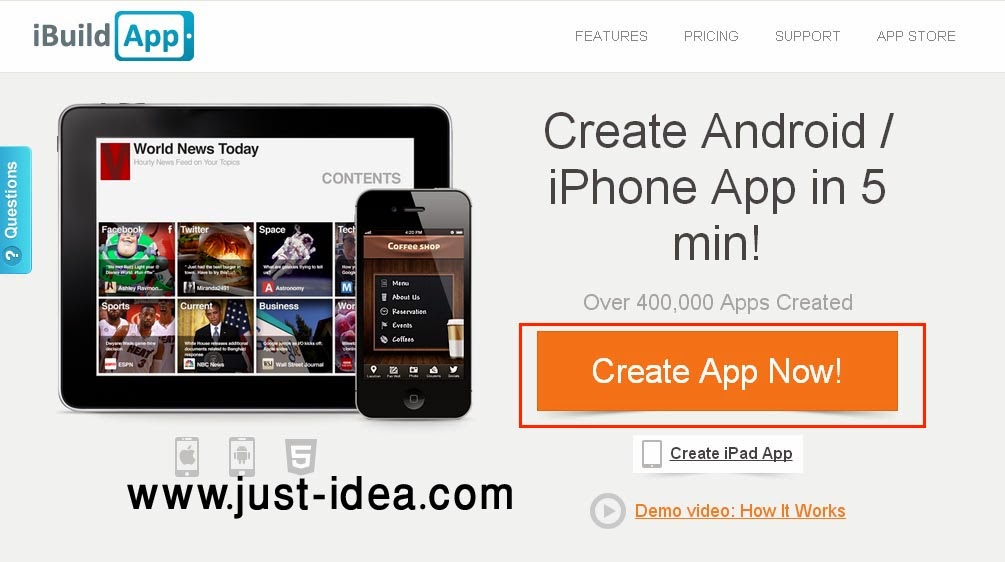
ibuildapp.com
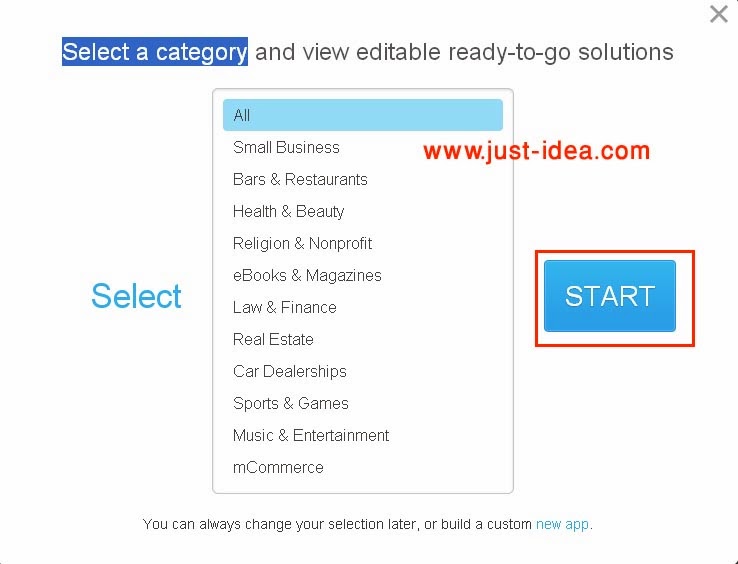
After that this screen will appear ,then select one category which is related the application then click start
 android app
There are many templates are viewed ,then choose the design of your application

android app

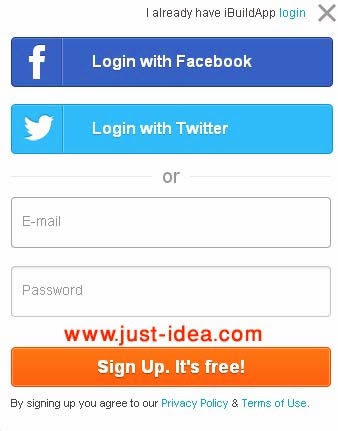
step 2: Sign Up an account for free

you can use email, facebook or tweeter in the register
register

step 3: Design your App

After login , you can cutomize your selected template , and add your logos and links.
  • You can select application's background thems from the backgrounds which are available on ibuildApp or upload your favorite thems from your PC.
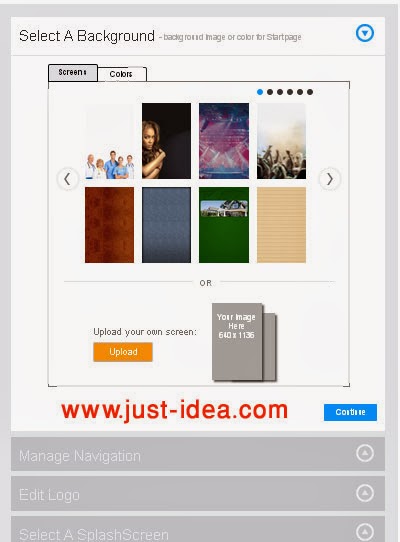
android app

  • Manage Navigation of your application and add the buttons and tabs which your application require it, such as about us , facebook pages , tweeter account,.....ect.
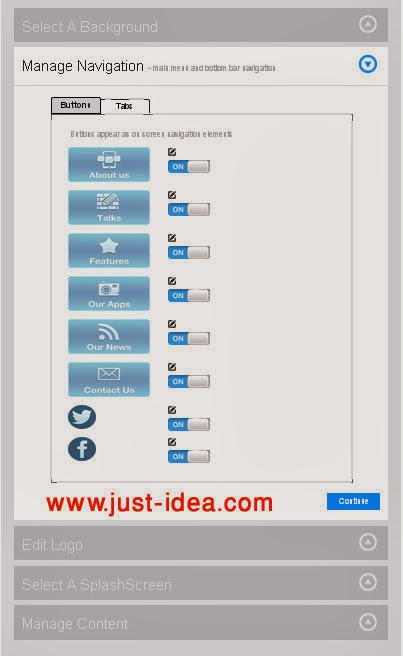
android app maker

  • Upload the suitable logo to your application , its dimensions should be 314w x 100h
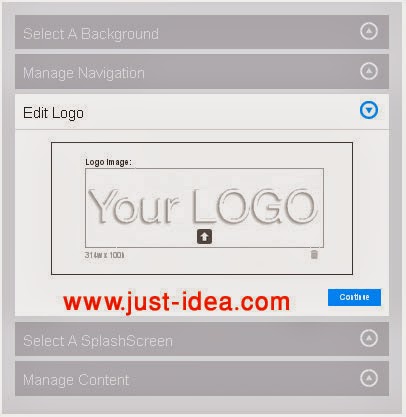
application logo
  • Then manage application content by editing the information of application tabs and widgets
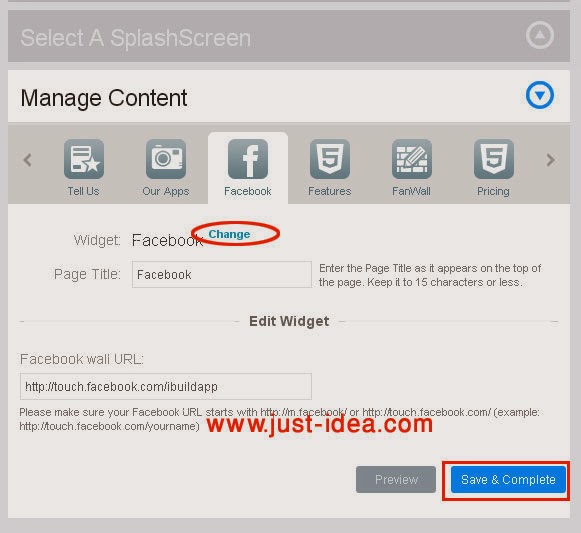
create mobile app

  • You can change the existing button by another by pressing change, and choose from many widgets. 
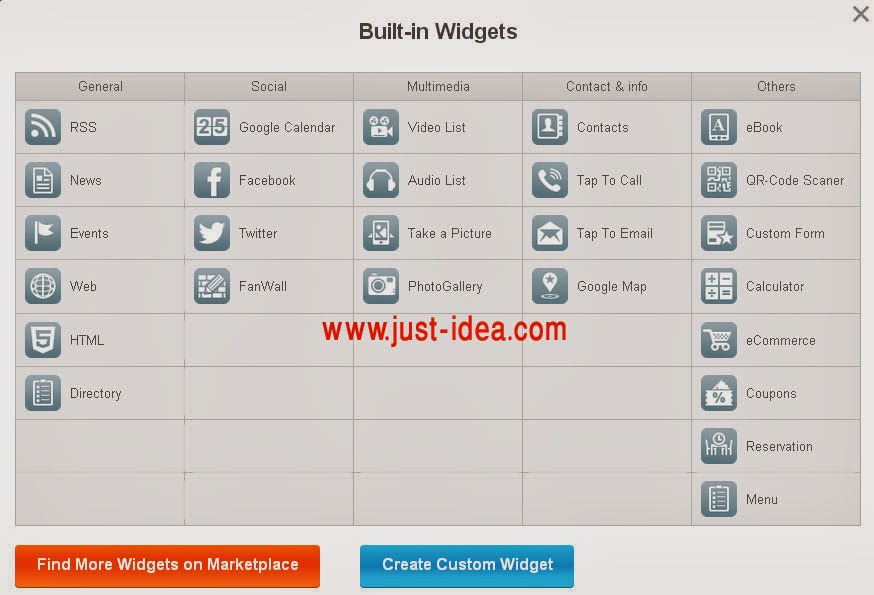
android widgets
  • Also you can use WYSIWYG editor to make changes and see how it will appear on your device
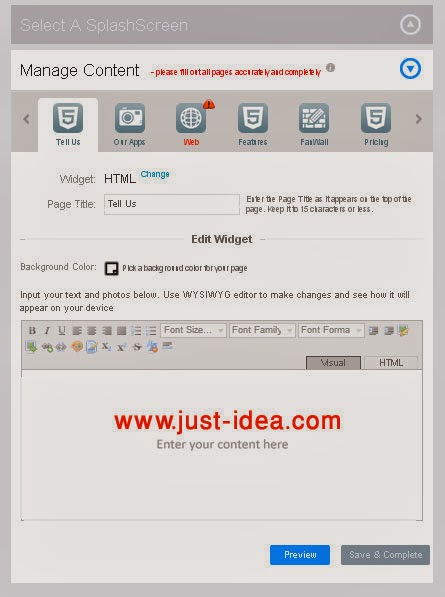
app maker

step4: save and publish

then you can preview your application and save it to publish.

Thursday, November 7, 2013

Most popular types of fonts for designing logo

When the logo designers have to create logos, they must select the right font according to some rules or guides, I subjected them before in this Thread . Now I review the most important and famous typefaces which is usually used in logo design. 
fonts-icon

category of type:

Choose a font that you think will match your design. ie. Oldstyle, Modern, Slab Serif, Sans Serif, Script, Decorative.

1. Helvetica:

Helvetica font
Helvetica may be considered to have a generic look,it is  popular due to It’s accessible and appealing.There are no distracting serifs  at the end of the letters and numbers. 
it’s possible to change the kerning and font style, for example light or extra bold to achieve something different, yet similar.

2. Frutiger:

Frutiger fonts
Frutiger is used in the identity of many brands, There are additional versions include Frutiger Next, Frutiger Arabic, Neue Frutiger, and Frutiger Greek variants. Its character is easily recognised.It is often used in magazines and booklets design.It has been also used as flickr logo font.

3. Myriad Pro:

Myriad Pro font 
The Myriad family is characterized  by a comfortable level of readability and accessibility,then this typface  met all of the requirements that any designer needed in the logo, so the most of designer used it.

4.Bickham Script:

Bickham Script

It is english hand writing typface .Recognized as a master designer of pointed-quill script typefaces.Bickham Script Pro is offered in regular, semibold, and bold weights, It is often used in restaurant logos, and packaging design.

5.Trajan:

Trajan font
Trajan is an old style serif typeface designed in 1989 by Carol Twombly for Adobe. The design is based on Roman square capitals. It has been used in a huge number of movie title sequences and appeared on National television worldwide in numerous title and more popular on DVD packaging.

6.Bodoni:

Bodoni font

Bodoni has classic style,so it has been used in many logos of advertisement, Bodoni also has been used as basic text font of many magazine publications,In addition it is used for logo,titles,headlines, decorative text.

7.Adope Garamond:

Adope Garamond

Garamond font family has been widely used,There are many versions of this typeface but Adope Garamond is the most popular,It has been used in design simple graphic logo such as recognizable Google logo.

8.Engadget:

Engadget font
Engadget was created by John Stracke, This font is called Engadget because it is based on the letters in the logo of the Engadget.com blog.

 9.Klavika :

Klavika font
Klavika family is an ideal workhorse typeface because of its multiple numeral styles ,Klavika is a flexible family of sans serifs for editorial and identity design.It is also popular for its use of Facebook’s main logo. 

10. Hoefler Text :

Hoefler Text

Hoefler Text is a contemporary serif Antiqua font that was designed for Apple Computer to demonstrate advanced type technologies. Hoefler Text was used in the Wikipedia logo until the 2010 redesign, when it was replaced with Linux Libertine.

Thursday, October 31, 2013

steps to create an excellant logo

In a previous post I presented the principles of a successful logo design, but the designing memorable logo need several stages and steps ,before you begin logo design, you must understand what a logo is and what it is supposed to do.
The steps below will take you through the process of designing a logo that will successfully brand you in the marketplace.
design tools

1.Determine the goal:

Determine the goal:

Try to get as much information about the company or project  which has logo will be designed, it is the most important step,Accordingly you can determine keywords should best describe your new logo and what type of logos typically appeal to you.

2. Research:

research icon
research includes general reading on the project  which has logo will be designed and check out its competitors, and this has a significant impact in the final appearance of the logo.

 3.Inspiration:

Inspiration icon
You can search in different logo resources for designers,and  inspired suitable design, that by using symbols and icons, the logo desingers attempt to establish an association between the brand name and the image.
However, actually incorporate both text and icons to form a unique logo design.

4. Sketching & mapping:

pencile
Begin to draw the idea on sketchbook ,then perform the design on the computer, this allows you to more of the planning and Map to become more attention to minuet details,it may take more time but more creative logo design will be resulted.

5.Implementation using softwar:

softwar icon png
After sketching an initial idea for the logo,then take your ideas to the computer and apply these ideas using a preferred design Software.

6.Fonts and Colors:

Fonts and Colors icon
Color combination and font variation have a great effect on the final result of logo,typefaces are selected according to certain criteria, which I talked about in a previous post.
Do not add color until you have decided on  ideas,and remember that's a good logo should work well in both black, white and color.

7.presentation:

Choose the appropriate formula to save the logo, You can check out  "how to choose a format of the logo"